Our first useful sales agent at Wingspan answered a narrow question: Is this company worth a rep's time?
It read public evidence, looked for signs that a company's service delivery depended on a large independent workforce, and scored the account. That signal mattered to us because normal firmographic data rarely captures it.
The system worked, but exposed another problem.
An account score tells a rep where to spend time. Winning the deal requires the full story: how the company operates, who matters in the buying process, what has already happened, which objections are open, what changed recently, and how much of the available data can be trusted.
We eventually turned that story into a shared Deal Context Model, a reusable account dossier, and a feedback loop that converts rep corrections into product work.
Wingspan helps companies manage and pay large independent workforces, including providers, drivers, adjusters, couriers, creators, tutors, clinicians, field technicians, and similar 1099 or contingent W-2 populations.
01
The buying signal was operational
ZoomInfo-style databases are good at company facts. They can usually tell you headcount, funding, industry, estimated revenue, and software usage.
Operational buying signals usually fall outside that data.
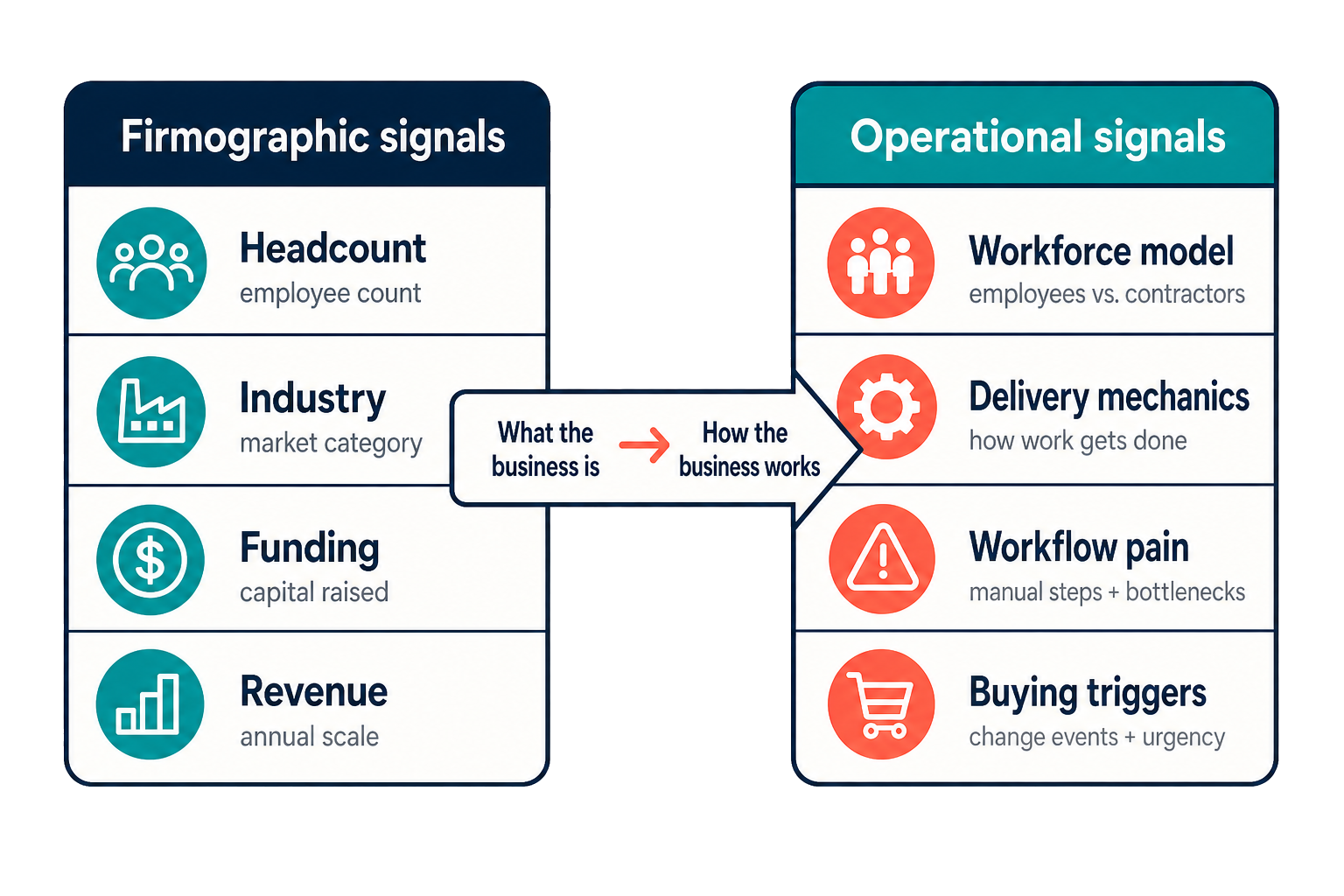
For Wingspan, we needed to know whether a company delivered its service through thousands of non-employee workers. A company could have the right size, industry, and growth profile and still be a poor fit because contractors were incidental to the business. Another could look unremarkable in a firmographic database while running its entire operation on providers, drivers, adjusters, couriers, creators, tutors, clinicians, or field technicians.
Most GTM teams have some version of this problem:
- A support automation company may care about high ticket volume paired with weak self-service documentation.
- A payments company may look for marketplaces with split-payment flows.
- A warehouse automation company may need to identify facilities with seasonal labor spikes and old fulfillment processes.
- A compliance company may care about employers with cross-border worker-classification risk.
- A field-services software company may look for poor Google Maps reviews, missed appointments, or visible customer complaints.
Those signals describe how a business works, and standard company records usually leave them out.
I built an internal research agent to find our version of that signal. It reads public evidence, classifies the account, saves its reasoning, assigns a score, and syncs the result to Salesforce and our data warehouse. I'll call it the GTM Agent here.
So far, the GTM Agent has:
- Completed more than 141,000 company research jobs
- Classified more than 24,000 contacts into buying-committee roles
- Captured more than 25,000 company-news events
- Registered more than 64,000 account and news monitors
Over the same period, new meetings booked increased 10x and MEDDPICC compliance went from 5% to 99%, without additional headcount.
02
We had to define what context meant
A strong rep combines market knowledge, account fit, stakeholder coverage, timing, objections, social proof, prior activity, and product judgment into a point of view. An agent needs access to the same raw material before it can do useful work.
We wrote that raw material down as a Deal Context Model.
| Context | Question | What belongs in it |
|---|---|---|
| Market context | What world does this company operate in? | Industry segment, buyer terminology, regulations, competitive dynamics, and common objections |
| Business-model context | How does the company make money and deliver its service? | Workforce model, contractor scale, delivery model, customer base, and operational bottlenecks |
| Worker and end-user pain | What do people inside or around the workflow complain about? | For Wingspan: provider onboarding friction, driver payout timing, adjuster paperwork, and tax-form confusion. Elsewhere: Google Maps reviews, app-store complaints, support forums, product reviews, and other public customer complaints |
| Account state | What do we know about the company right now? | Salesforce fields, opportunity stage, tier, research confidence, recent news, and open questions |
| Buying-committee context | Who matters, and who are we missing? | Economic buyer, operations owner, finance stakeholder, technology stakeholder, champions, and blockers |
| Relationship and activity history | What has already happened between us and them? | Calls, cold-call transcripts, meetings, emails, Outreach sequences, rep notes, objections, and next steps |
| Wingspan competitive context | Which proof or competitive angle should we use? | Relevant social proof, incumbent solution, competitor mentions, case studies, battlecards, and approved proof points |
| System context | How much should the agent trust the available data? | Source freshness, source status, record counts, conflicting evidence, feedback history, and permission boundaries |
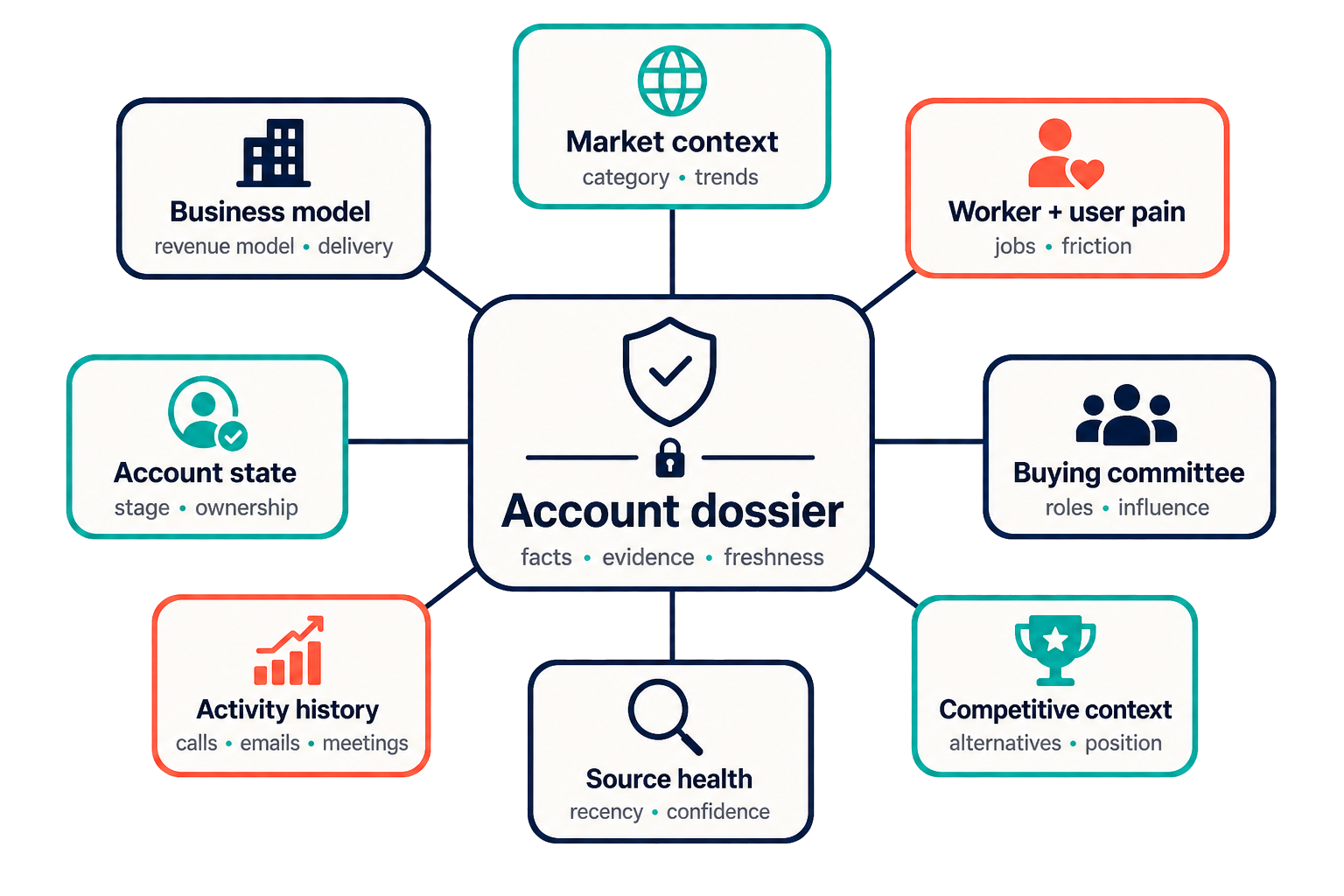
Once the model existed, we mapped each part to its source.
Some of the data lived in Salesforce fields. Other pieces were buried in call transcripts, support tickets, product usage data, internal documents, Slack threads, battlecards, or warehouse tables. For an agent to use that information at the right moment, each source needed a governed retrieval path.
BigQuery became the analytical foundation. I ETL’d data from Salesforce, Gong, Nooks, Outreach, GTM Agent research, enrichment sources, and other operational systems into the warehouse. That gives us one place to query account state, activity, conversations, engagement, and derived intelligence.
An MCP layer sits above the warehouse and source systems. It exposes purpose-built tools with permission controls, so each user can access only the account, call, CRM, document, warehouse, and sales-asset data they are allowed to see. Reps get one working interface, and agents get permission-scoped access.
Each source contributes something different:
- The GTM Agent provides evidence about account fit.
- Clay provides people data.
- Gong and Nooks provide sales conversations.
- Outreach provides engagement history.
- Salesforce provides account and opportunity state.
- Notion provides industry briefs, market structure, and segment-specific pain.
- Competitive assets provide social proof, incumbent context, and approved talk tracks.
- Rep feedback supplies first-party corrections available only from the sales team.
The result is reusable account memory that any agent can reason from. Dashboards can display parts of the picture; the context model gives a workflow enough structure to act.
A good rep can infer contractor usage manually. They read the company website, find provider or contractor sign-up pages, scan job postings, check help-center language, review recent news, and decide whether the company is a direct prospect, a partner prospect, or a bad fit.
That works one account at a time. It breaks at market scale.
The GTM Agent runs a structured version of the same process:
- Deep Research: Claude researches the company and produces an evidence-backed report.
- Structured Data Extraction: Gemini extracts stable fields from that report, including workforce model, classification, contractor scale, confidence, evidence quality, and fit signals.
- Deterministic Scoring: A scoring model tiers the account using contractor scale, market segment, growth, classification, and evidence quality.
- Sync: The result syncs to Salesforce, where the rep can use it.
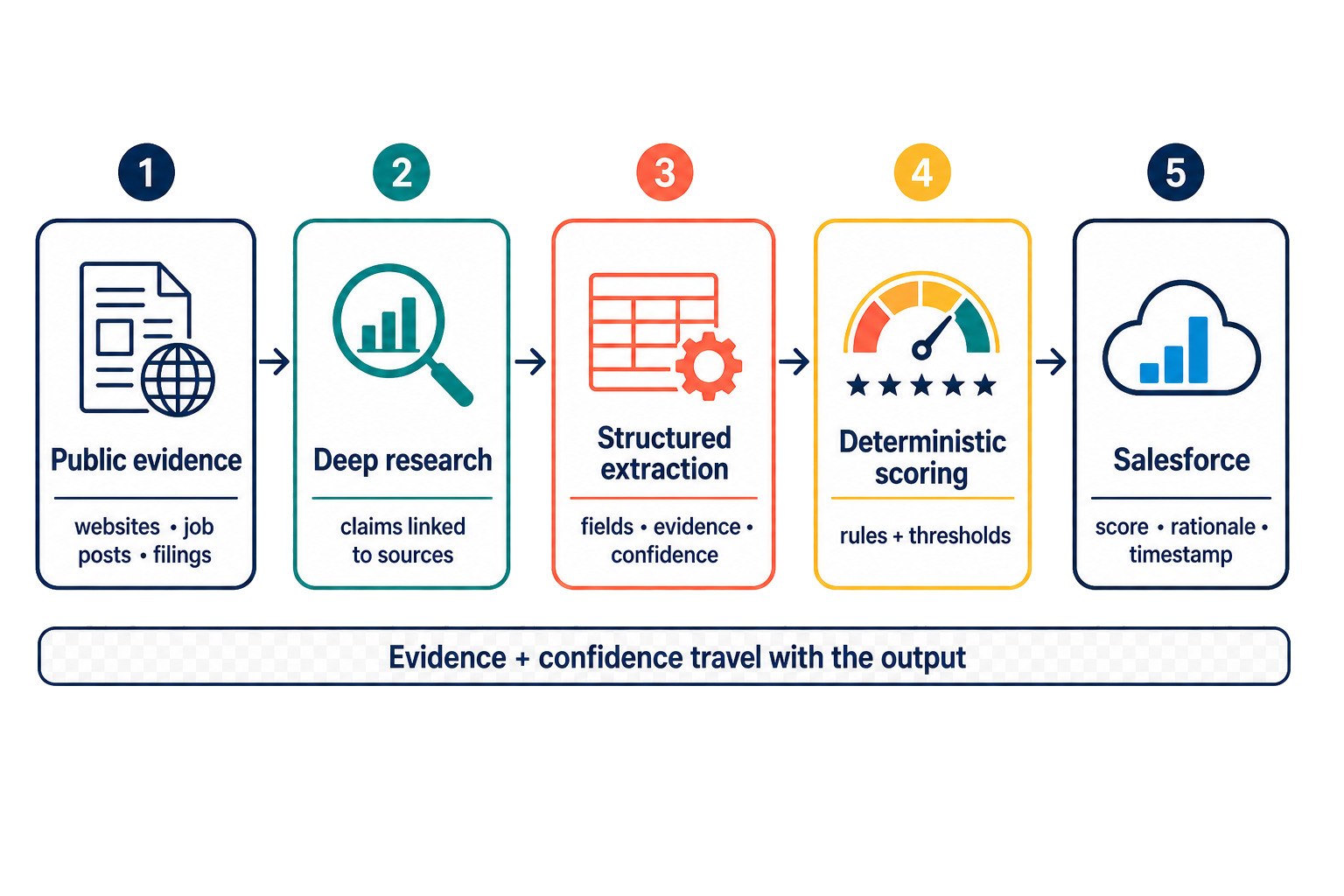
A simplified output looks like this:
| Field | Example |
|---|---|
| Workforce model | Uses individual 1099 contractors |
| Prospect classification | Direct prospect |
| Contractor scale | High |
| Evidence quality | Strong direct evidence |
| Market segment | Telehealth, field services, logistics, claims, or another contractor-heavy segment |
| Recommended action | Prioritize for outbound, map the buying committee, and personalize around segment terminology |
The evidence stays next to the recommendation. A score by itself asks the rep to trust a number. A score with evidence gives them something they can verify, challenge, or correct.
SDRs now spend 95% less time on manual prospecting research because the system handles the first account read, classification, evidence gathering, and Salesforce sync.
The pattern turned out to be reusable:
- Produce a research report that includes evidence and uncertainty.
- Extract stable fields from the report.
- Use those fields as the basis for scoring and classification.
- Put the evidence beside the recommendation.
- Save corrections as future eval cases.
We also use Parallel's Monitor API to watch target accounts each day. Parallel surfaces changes from the web and news. Gemini 3.6 Flash then decides which events matter to sales before notifying the GTM team. This gives the agent a fresher read on timing than occasional manual research.
At that point, we had a proprietary account signal. The next step was turning it into a complete system that could help a rep win the deal.
04
Our first architecture duplicated context everywhere
Once the research existed, we wired it into call prep, outreach, account prioritization, Salesforce hygiene, deal coaching, and buying-committee mapping.
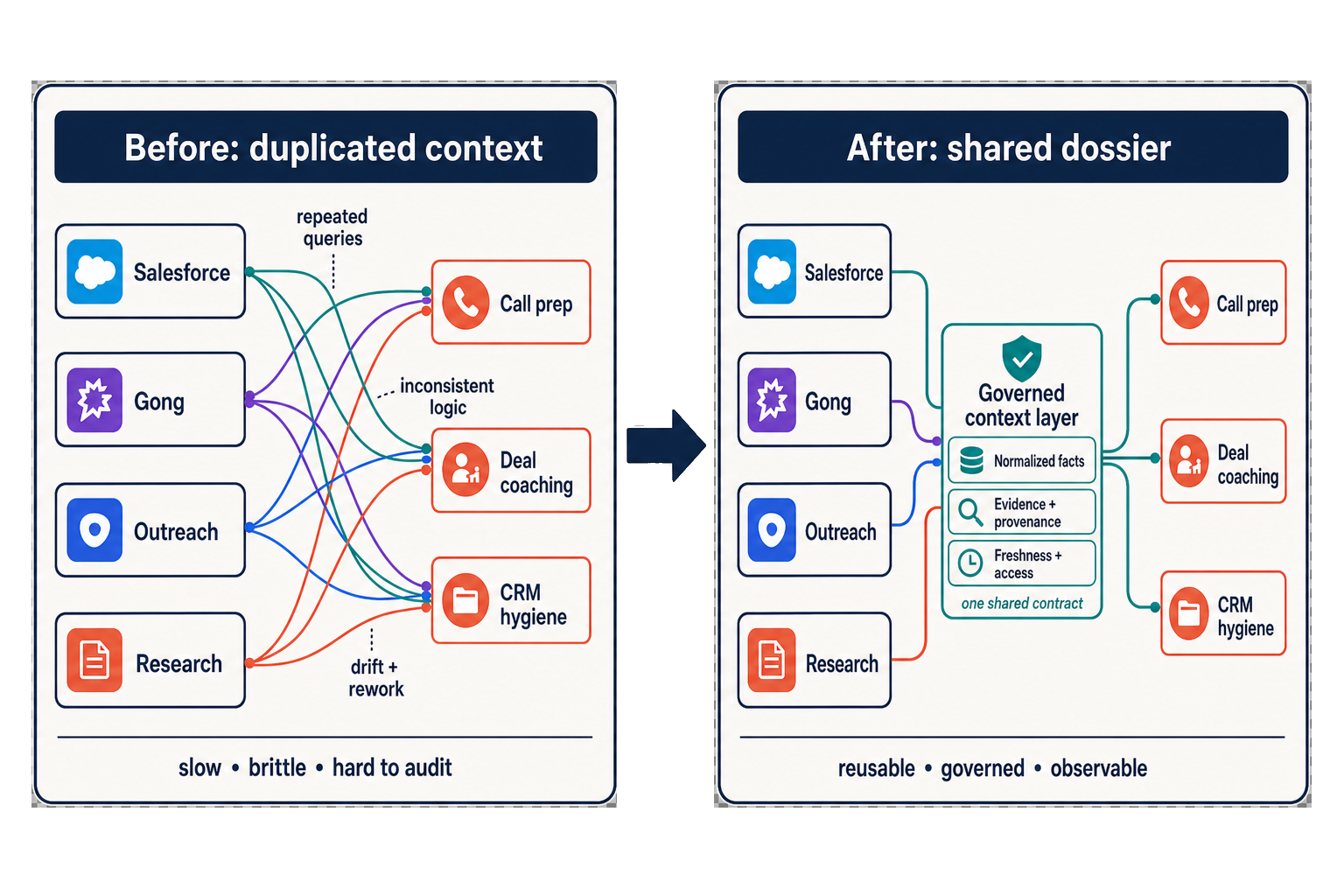
The first design made an obvious mistake: every skill fetched its own data.
Outreach prep pulled Salesforce records and call transcripts. Deal coaching pulled the same sources. Pipeline review did it again. So did Salesforce hygiene. Each workflow assembled its own partial version of the account.
That caused three problems:
- Workflows were slower and more expensive than they needed to be.
- A data-model change could break several skills at once.
- Two skills could reach different conclusions about the same company because they were looking at different slices of context.
We moved context retrieval into a shared layer, with the Deal Context Model serving as the contract for every workflow.
05
The dossier became the interface
For each agent run, our tools assemble an account dossier as an XML file on the filesystem. It contains the full packet: company identity, research, CRM state, opportunities, contacts, calls, emails, outreach history, industry context, source status, and known gaps.
Every skill reads the same account-level interface, while the shared tools handle source selection and retrieval.
Most skills need only one or two internal MCP tools:
- get_sales_account_dossier returns the full Deal Context Model for one account.
- get_sales_account_updates returns recent changes for a rep, owner, or set of accounts.
Those tools build the dossier in three stages:
- Identity resolution. Match the requested company to the correct Salesforce account, GTM Agent job, contacts, opportunities, and external records.
- Parallel collection. Pull the relevant data from the GTM Agent, BigQuery, Salesforce, Gong, Nooks, Outreach, Notion, and industry-context sources.
- XML assembly. Write one structured dossier that agents and sub-agents can inspect during the run.
<account_dossier>
  <identity>
    <company_name>Example Company</company_name>
    <salesforce_account_id>...</salesforce_account_id>
  </identity>
  <business_model>
    <workforce_model>Individual 1099 contractors</workforce_model>
    <contractor_scale confidence="high">...</contractor_scale>
  </business_model>
  <buying_committee>
    <contact role="economic_buyer">...</contact>
    <missing_role>Technology stakeholder</missing_role>
  </buying_committee>
  <activity_history>
    <last_call>...</last_call>
    <open_objection>...</open_objection>
  </activity_history>
  <source_status>
    <source name="salesforce" status="fresh" />
    <source name="gong" status="available" />
  </source_status>
</account_dossier>
The filesystem-backed XML matters because chat summaries are lossy. A call-prep skill can read the dossier and select the attendee, opportunity, objection, and account-history fields it needs. A Salesforce-hygiene skill can give the same dossier to sub-agents that inspect individual accounts and propose field updates. Deal coaching can send stakeholder coverage to one sub-agent and recent calls to another.
The workflows now behave like specialists reading the same case file. Context collection happens once in the shared layer.
06
Skills define jobs; tools provide connections
Once the dossier existed, the skills became much easier to build and review.
The rule we use is simple: skills describe the job, while tools handle the connections.
"Prepare for a call" is a skill. "Query Salesforce" is a tool call.
"Maintain Salesforce hygiene" is a skill. "Read the account dossier" is one step inside it.
We use Claude Enterprise, and the skills live in GitHub. A change goes through review, merge, and deployment through Claude's organization plugin management and GitHub sync. A workflow that begins as one rep's prompt can become a versioned operating procedure. Nobody has to copy a new prompt into their own Claude account.
The repository creates useful constraints. We review skills like software. Their names match the jobs reps request. Shared references, source rules, and privacy constraints live beside each workflow in version control. New reps receive the same call-prep, prospect-intel, feedback, and Salesforce-hygiene procedures as the rest of the team.
This changed how people worked day to day. Reps spent less time bouncing among Salesforce, Gong, Outreach, and research dashboards. Those products still matter as systems of record and source data. Claude increasingly became the working interface: get the account brief, prepare for a meeting, map the buying committee, score outreach, approve a CRM diff, or file feedback.
07
What reps can do with the dossier
Prospect intelligence
The prospect-intel skill gives a rep a fast read on the account. It explains the fit classification, shows the supporting evidence, recommends the terminology to use, surfaces recent public changes, and identifies gaps that still need a human check.
The rep starts with a useful account brief.
Call prep and follow-up
Before a meeting, the agent prepares an account thesis, attendee summary, opportunity status, recent activity, known objections, a suggested agenda, and specific questions.
Afterward, it drafts the buyer follow-up, internal summary, action items, qualification updates, and risks to the next step.
The agent keeps the thread. The rep edits the work and decides what goes out.
Salesforce hygiene
The Salesforce-hygiene workflow compares recent calls, emails, tasks, opportunity history, GTM Agent research, and rep notes with the current CRM fields. It presents proposed changes as a reviewable diff before anything is written.
| Field | Current value | Proposed value | Evidence | Confidence | Action |
|---|---|---|---|---|---|
| Decision criteria | Blank | Needs contractor onboarding before upcoming launch | Call transcript and email thread | High | Accept or reject |
Sensitive writes stay behind approval. That added friction to the earliest version, but it also built trust. Reps could inspect the evidence, accept strong suggestions, reject bad ones, and show the system what it had missed.
Buying-committee mapping
Contact enrichment identifies who works at an account. Assessing whether the deal has enough coverage to close requires a broader view.
This skill combines enriched contact data, AI-classified roles, org-chart inference, call mentions, email engagement, and opportunity context. It shows which roles are covered, which stakeholders are missing, whether the deal is stuck below the executive level, and which contacts have actually engaged.
The skill centers a more useful question: "Do we have enough of the buying committee engaged to win?"
Outreach quality
The outreach-quality workflow scores research relevance, email quality, multi-threading, and phone discipline. The score is useful only because it points to a behavior a manager can coach.
Strong research paired with a generic email means the rep needs help with personalization. A good email sent to one person points to weak stakeholder coverage. Calls without follow-up point to a follow-through problem.
08
Feedback has to be easier than complaining
The give-feedback skill became the quality loop for the whole system.
Early versions of the GTM Agent had a familiar product problem: users saw errors before the system did. A rep might notice a misclassified company, an incorrectly tiered contact, a weak industry label, or a research report that missed something the team knew firsthand.
In practice, those observations often disappear into Slack threads and hallway conversations unless the product captures them directly.
The feedback workflow captures:
- Which AI feature produced the issue
- Which account or workflow it affected
- What the system said
- What the rep believes is correct
- What evidence supports the correction
- Whether the issue blocked real sales work
- Whether the failure involves classification, taxonomy, stale data, missing context, contact quality, a source problem, or output quality
It also attaches the relevant dossier, saving the rep from pasting screenshots or rebuilding the prompt history.
Different problems take different paths:
- Taxonomy feedback changes market categories, buyer terminology, or segment definitions.
- Classification feedback becomes a prompt, extraction, or scoring fix.
- Missing-context feedback leads to a new source or a dossier change.
- Contact-quality feedback goes to the buying-committee or enrichment workflow.
- Bad workflow behavior becomes a skill update.
- Repeated failures become eval cases for future versions.
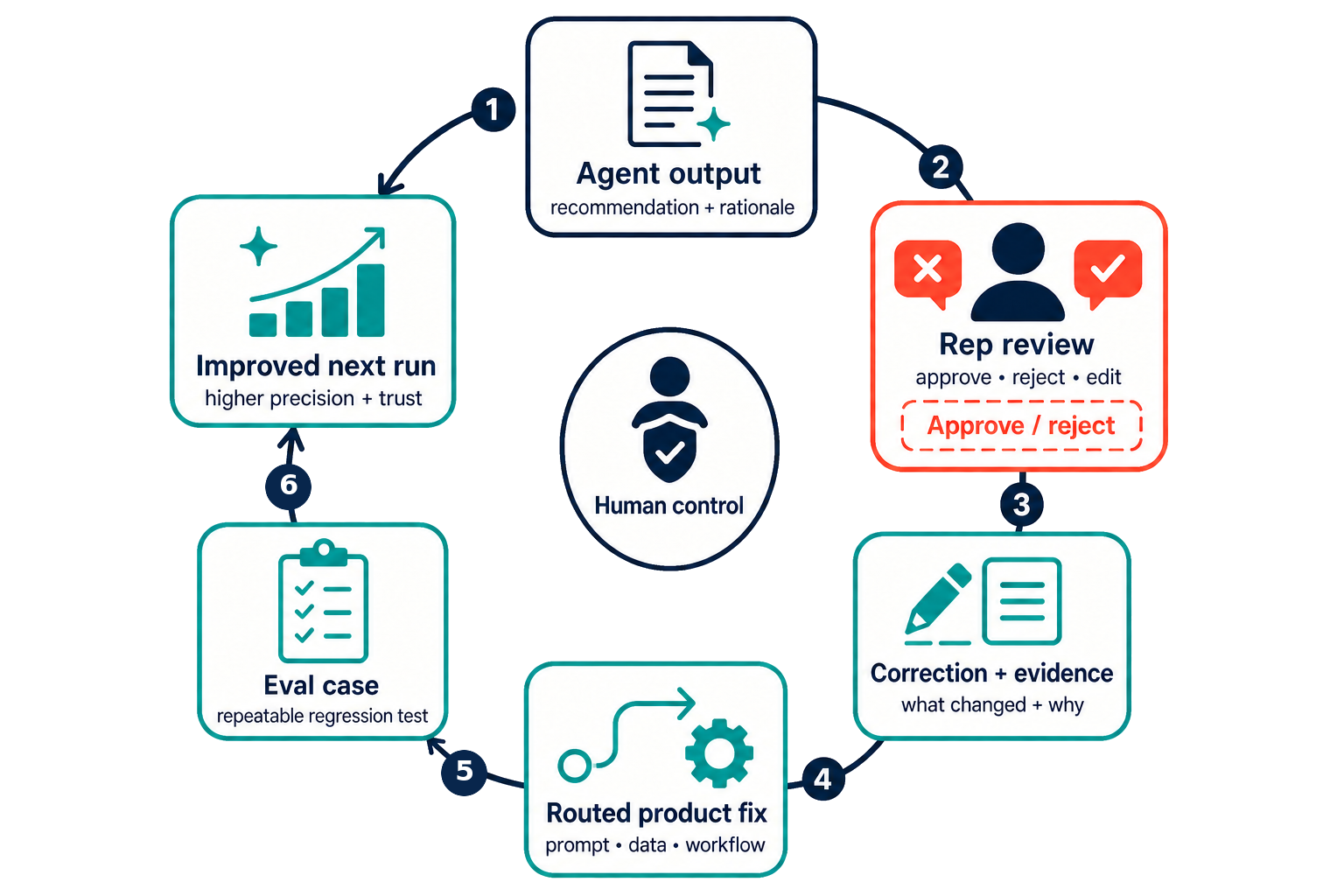
This loop improved partner classification and made our taxonomy more specific to how buyers operate.
It also changed the way reps reported problems. They could say, in sales language, "This output is wrong. Here is why, and here is the evidence."
That is the standard I would use for any internal AI product. Reporting a bad result must be easier than complaining about it. Once feedback feels like extra administrative work, the system stops learning from the people closest to the customer.
09
How I would build this from scratch
I would build it in four steps.
1. Start with one measurable workflow
Choose a workflow that is frequent, rich in evidence, relatively low risk, and easy to measure. Prospect research, call prep, CRM hygiene suggestions, follow-up drafting, and buying-committee review can all work.
Prospecting was the right starting point for us because our most important ICP signal had to be inferred from public evidence.
2. Define the context model
Before building a catalog of skills, write down what a strong rep would want to know:
- What market is the company in?
- How does its business model work?
- Which evidence strengthens or weakens account fit?
- Who is on the buying committee?
- What has already happened between the two companies?
- Which social proof, competitive assets, incumbent details, or talk tracks apply?
- What changed recently?
- Which sources are fresh, stale, empty, or in conflict?
Then map each answer to a source and an access path.
| Context needed | Source | AI access path |
|---|---|---|
| Opportunity state | CRM | Permissioned MCP tool |
| Recent objections | Call transcripts | Permissioned MCP tool |
| Incumbent solution | CRM notes and call transcripts | Dossier field |
| Relevant social proof | Approved sales assets | Knowledge-base tool |
| End-user complaints | Calls, reviews, support data, and research | Dossier field |
| Source freshness | Data-source metadata | Dossier source status |
That table becomes the shape of the dossier. The MCP layer becomes the governed path agents use to retrieve it.
3. Build account-level tools before a large skill catalog
As soon as two workflows need the same account context, stop letting them query every system independently.
Build one or two internal MCP tools that assemble the account-level context. Include source status and enough structure for agents and sub-agents to select what they need.
This keeps each new skill thin. The skill owns the job. The MCP tool owns context assembly.
4. Treat feedback as a product workflow
Put feedback where reps already work.
Capture the bad output, the correction, supporting evidence, the affected workflow, and severity. Route the issue into the product backlog. Add repeated failures to evals.
When feedback is hard, reps stop giving it.
10
It changed how I evaluate GTM software
I use fewer native GTM interfaces than I used to. The team does more routine work through Claude and agent workflows.
Salesforce remains the system of record. Gong, Outreach, Nooks, and enrichment tools remain important source systems. What changed is the place where the work happens.
A rep spends less time editing records directly in Salesforce. An agent reads the underlying data, proposes the next action, and writes back after the rep approves.
I now care whether a GTM tool can do at least one of two things:
- Sync cleanly into our warehouse or CRM
- Expose APIs or MCP tools that an agent can call
When critical data is trapped inside a product's own interface, it limits the rest of the GTM system.
A polished dashboard is still useful, but I now place more value on tools that can participate in a larger loop: account context, suggested action, human approval, feedback, and monitoring.
I have also experimented with Clearskies, which approaches a similar context problem from the product side. The direction makes sense to me. Starting with a governed, complete account picture gives revenue AI a stronger foundation for every task.
11
What changed
This started as a prospecting system.
Prospecting forced us to build a shared context layer. That layer made the skills more reliable. The skills produced approvals, rejections, and corrections, which improved the next run.
A prompt is easy to copy. So is a model choice. The harder thing to copy is the operating system around them: proprietary signal, governed account context, human-approved action, and a feedback loop that gets better every time a rep says, "This is wrong, and here is the evidence."